Showing posts with label mint. Show all posts

Tuesday, 4 June 2013

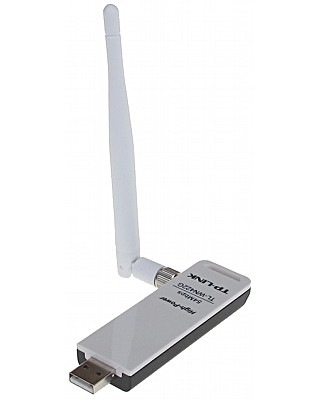
Quick install of Linux firmware htc_9271.fw for TP-LINK TLWN422G USB Wireless


Download firmware from here or search for newer.
http://wireless.kernel.org/download/htc_fw/1.3/htc_9271.fw

sudo cp htc_9271.fw /lib/firmware/.

Plug in device and do a dmesg to see if firmware is loaded.


Works great on airodump-ng, injection is super.\


lsusb

Bus 001 Device 004: ID 0cf3:1006 Atheros Communications, Inc. TP-Link TL-WN322G v3 / TL-WN422G v2 802.11g [Atheros AR9271]


Don't waste time trying to compile anything else.


WindyCityTech Blogger
WindyWindyCityTech Wordpress

Sunday, 17 February 2013

Naultilus error in Truecrypt, not available

Error message using truecrypt in mint mate

When double clicking to open a volume from the Truycrypt gui, it calls nautilus.  Nautilus may not be installed on your system or having it running alongside caja is yuck.  There is no easy way to configure which file manager to be used in the preferences.

Since caja and nautilus have similar command line arguments a simple symbolic link is possible

sudo ln -s /usr/bin/caja /usr/bin/nautilus

WindyCityTech Blogger
WindyWindyCityTech Wordpress

Notes for setting up openssh server in Linux for Public Key Authentication only

On Client Machine
ssh-keygen -t rsa -b 1024
check to see if permissions for id_rsa is rw-------

On Client Machine copy public key to the server:
scp id_rsa.pub server@192.168.0.1:/home/server

On Server Machine append public key to authorized_keys
cat id_rsa.pub >> ~/.ssh/authorized_keys

On Server Machine
sudo nano /etc/ssh/sshd_config
Edit these...
%h/.ssh/authorized_keys
PubkeyAuthentication yes
PermitRootLogin        no
PasswordAuthentication    no
UsePAM            no


WindyCityTech Blogger
WindyWindyCityTech Wordpress

Sunday, 13 January 2013

How to get file seach working properly in Linux Mate Mint

Whoever decided to cripple the default search (mate-search-tool) should be shot out of a cannon. 
The default search searched through a database which was only update once a day via cron.  This can be evidenced by performing a seach and noticing that little in the way of HDD access is occuring (it not really searching).  Also there is not ovbious way to change the search preferences like in MS windows.
Why perform a search when it does not turn up 100% correct results.  The trade over speed and accuracy is idiotic and pathetic, even the MS file search provides better results.

Here's how to fix it.

open mateconf-editor and navigate to /apps/mate-search-tool/
check off; disable_quick_search, show_additional_options


now open mate-search-tool and take a look!  Looks nice and actually works, searches attached usb drives and the lot.


references:
man locate
man updatedb

WindyCityTech Blogger
WindyWindyCityTech Wordpress

Saturday, 15 December 2012

Creating a custom montitor configuration in mate Linux laptop that sitcks!

Scenario:
One laptop and one external monitor.
The laptop screen is the primary monitor (LVDS1)
The external monitor is the secondary monitor, orientated left (HDMI1)

Problem:
When the lid of the laptop is put down and then raised, the screens do not retain resolution settings and does either one of the following:
Laptop LCD off
Laptop LCD resolution wrong
External monitor rotated back to normal instead of orientated left.

Why this is happening:

It seems that there are too many things that can cause the screen resolution to change, including ACPI daemon, mate screensaver, lid.sh....  Too many cooks spoil the broth....

Solutions:
The manual solution is to unplug the HDMI cable and lower and raise the lid and then plug HDMI back in.  Not good enough.

Control freak Solution:
First get your screen setup right, use the 'mate-display-properties' to get your resolution and orientation correct.

Then open 'mateconf-editor' and tweak these settings:
apps/mate-power-manager/buttons  lid_ac = nothing
This will now prevent your system form changing your monitor settings on your behalf.


In a command line as a normal user excute the xrandr command.

Screen 0: minimum 320 x 200, current 2266 x 1440, maximum 8192 x 8192
LVDS1 connected 1366x768+0+327 (normal left inverted right x axis y axis) 344mm x 193mm
   1366x768       60.0*+
   1360x768       59.8     60.0 
   1024x768       60.0 
   800x600        60.3     56.2 
   640x480        59.9 
VGA1 disconnected (normal left inverted right x axis y axis)
HDMI1 connected 900x1440+1366+0 left (normal left inverted right x axis y axis) 410mm x 256mm
   1440x900       59.9*+   75.0 
   1280x1024      75.0     60.0 
   1280x960       60.0 
   1152x864       75.0 
   1024x768       75.1     70.1     60.0 
   832x624        74.6 
   800x600        72.2     75.0     60.3     56.2 
   640x480        72.8     75.0     66.7     60.0 
   720x400        70.1 
DP1 disconnected (normal left inverted right x axis y axis


translating from the xrandr output, a single line command to reset the screen to the desired dimension can be found:

xrandr --output LVDS1 --mode 1366x768 --rotate normal --output HDMI1 --mode 1440x900 --rotate left --right-of LVDS1

Now at this stage, depending on your situation, you can 'hardcode' you configuration into your system and make it stick OR crate a xrandr script that is manually activated.

looking in /etc/acpi/events/lidbtn shows that the script /etc/acpi/lid.sh
 is called when the lid button is activated

# /etc/acpi/events/lidbtn
# Called when the user closes or opens the lid

event=button[ /]lid
action=/etc/acpi/lid.sh


Having a look in the last line of /etc/acpi/lid.sh yeilds this:

[ -x /etc/acpi/local/lid.sh.post ] && /etc/acpi/local/lid.sh.post

This file lid.sh.post, if exists is excututed when the lis switch is activated.  Note that this file does not exist by default, so it needs to be made.

sudo mkdir /etc/acpi/local/
sudo touch lid.sh.post

add this to the file lid.sh.post

#! /bin/sh
xrandr --output LVDS1 --mode 1366x768 --rotate normal --pos 0x327 --output HDMI1 --mode 1440x900 --rotate left --pos 1366x0 --right-of LVDS1


then make it excutable:
sudo chmod +x lid.sh.post

Test to see if the lid closing and opening changes the screen setup.


References:
http://dosnlinux.wordpress.com/2007/01/19/xubuntu-acpi-the-lid/


WindyCityTech Blogger
WindyWindyCityTech Wordpress
caja Mint 14 mounting /media/user udisks2

New behavior in Mint 14, flash drives, usb drives now mount in /media/$USER/$DEVICE

Caused by the udisks2.  Cannot remove udisks 2 easily because the rest of the system relies on it.

A lot of people are angry about the lack of documentation associated with this major change and rightfully so.


It is still not clearly illustrated why the writer of udisks2 has decided to change the way we look at out personal filesystems but there are a few options.

Fight it:
http://www.linuxmint-fr.org/forum/33-trucs-et-astuces/127919-udisks2retrouver-montage-dans-media-et-non-mediauser.html
(use google translate)
or
Create several symlinks each session, ugly...

Roll with it:
Disable caja from automounting, as it still defaults to /media/$DEVICE
run, mateconf-editor -> search for keys called automount -> disable automounting


Although there are changes to the filesystem, it still works.  Users have th be cautious upgrading their systems as torrent clients and VM on other partitions cannot be found straight away.

WindyCityTech Blogger
WindyWindyCityTech Wordpress

Getting PDW working using Virtualbox with linux host, pager decoder, pocsag


PWD is a great program for decoding pager tones, but it works only on windows.

If you are using virtualbox for windows on a Linux Host and have the group permissions set correctly, then you can decode from the sound card.

Of course you will need a scanner with a discriminator tap installed.  Connected to the input of the soundcard.

Tested on Mint Mate.

First, run alsamixer and unmute your sound card input channel, so you can monitor the sound comming in.  In my case, go to Mic and press "M" key to unmute.  The sound sound should be heard on the pc speakers.


Then open up Virtualbox (version 4) and select settings to ensure Also host driver is selected.


Then on the windows client, ensure that mic is selected, and pager tones can be recorded on the client, use sound recorder.


WindyCityTech Blogger
WindyWindyCityTech Wordpress

Notes for compiling DSD for Linux Mate, digital sound decoder


DSD is a digital sound decoder.  It captures demodulated data tones from a radio scanner and processes them to decode the signal.  The sound source from the scanner comes from the scanners discriminator tap.  The Discriminator tap is the stage before audio filtering and amplification.  The best place to get data tones from a analouge radio receiver.  It is never 100% due to the analouge domain being digitised by the soundcard, sampling/noise may corrupt the data.

Gathered from various internet sources, works on Mint 13 (Maya).

DSD does not natively install on Linux Mint Mate without a few mods.  This is due to the lack of the oss soundsystem and /dev/dsp.  A patch is required for dsd_audio.c and both the makefiles of DSD and mbelib have to be modified.

Download dsd and mbelib, extract to seperate folders.

Download modified Makefiles from http://www.tarapippo.net/linux/dsd-makefiles.tar.gz
Extract and rename / overwrite the Makefiles for both DSD and mbelib.

Navigate to the mbdlib folder and:
make
sudo make install

Download dsd_audio_patch.txt from the fourm http://forums.radioreference.com/digital-voice-decoding-software/220493-fix-ubuntu-10-10-a.html

Navigate to dsd folder and patch dsd_audio.c with the following command:
patch dsd-1.4.1/dsd_audio.c dsd_audio_patch.txt

Then you can run (./configure not needed) and make command to compile the code.

now to test before installing.

Run DSD using the following command:
padsp -- ./dsd -i /dev/dsp -o /dev/dsp

padsp is making the OSS wrapper for dsd.

tip: First, run alsamixer and unmute your sound card input channel, so you can monitor the sound coming in.  In my case, go to Mic and press "M" key to unmute.  The sound sound should be heard on the pc speakers.


WindyCityTech Blogger
WindyWindyCityTech Wordpress

enable numlock at session start, linux mint, num lock

If you need the numlock to be on after logging in...

sudo apt-get install numlockx

easy.

If you need numlock on before logging in try using setleds in a rc.d or init.d script.  Reference: https://www.redhat.com/archives/redhat-install-list/2004-June/msg00108.html

 setleds -D +num < /dev/tty1

WindyCityTech Blogger
WindyWindyCityTech Wordpress

Thursday, 30 August 2012

Installing scalpel on Linux Mint Mate

sudo apt-get install libtre5 libtre-dev

download  and extract the scalpel source from http://www.digitalforensicssolutions.com/Scalpel/

usual tar -xzf ,  ./configure make / make install....

Now go throught scalpel.conf and edit out files formates you are likely to encounter.  By default they are all commented out.

Also remember that you have to have your scalpel.conf file in the present working directory when executing scalpel or use the command 'scalpel -c /path/to/scalpel.conf/'

WindyCityTech Blogger
WindyWindyCityTech Wordpress

Tuesday, 28 August 2012

Automount hard drives and partitions on startup for Linux Mint Mate Ubuntu

sudo apt-get install pysdm 

Run as root from the command line

Click on the partitions you want to mount at startup, click assistant button and make sure that the check box 'file system is mounted at boot time', is selected.

Important! If your drives are named by the UUID, they will be renamed by the partition number.  i.e /media/0546188641348786  may become /media/sda3 .  This is guaranteed to break any previous references to files and folders stored in music playlists or other programs that previously used the uuid paths.  You will have to go back and quickly edit these files to the correct path

WindyCityTech Blogger
WindyWindyCityTech Wordpress

Monday, 27 August 2012

Gimp 2.8 Auto Export No Prompt Save Fix [solved]

I was happy to get the new gimp 2.8 as it had the promised one window feature, yay!

But soon, I noticed that they have stuffed up on another important feature, saving...  One step forward, one step backwards.

Saving now saves a image as a XCF file, which is has a serious ability to interrupts ones workflow.  Unfortunately Gimps designers have no clue what most people use Gimp for, I will break it down:
  1. Take a photo with the camera as a JPG
  2. Edit the photos with Gimp
  3. Overwrite-save the photo back as a JPG <<<<----  Important!
  4. Close Gimp on to other things
Unfortunately in Gimp 2.8 they make you do it more like this:
  1. Take a photo with the camera as a JPG
  2. Edit the photos with Gimp
  3. Export the photo back as a JPG
  4. Be bombarded with several options on how to save the image...
  5. Close Gimp and still be reminded that you have not saved the image as a XCF  FFFFFFUUUUUUUUUUU!!!!!!!!1

Alot of people are completely pissed about this 'feature' and would like to a workaround.  Of course there is nothing in settings to help you but someone named Akkana Peck has come to save us with a cool script to help.
https://github.com/akkana/gimp-plugins/blob/master/save-export-clean.py

Applying the script is easy, just navigate do the following commands in the terminal:

cd ~/.gimp-2.8/plug-ins/
wget https://raw.github.com/akkana/gimp-plugins/master/save-export-clean.py
chmod +x save-export-clean.py

Restart gimp and now you will be greeted with a Save/Export Clean button in the File menu, yay.

Now remap the keyboard shortcut CTRL+S to this button in the preferences and everything will be golden!  It is found in Edit > Preferences > Interface > Configure Shortcuts.  Search for 'save' and look under Plug-ins.


Thanks Akkana you are awesome!


WindyCityTech Blogger
WindyWindyCityTech Wordpress

Sunday, 26 August 2012

Adding custom location in places on Linux Mate Mint Caja

Basically you need to put a custom location place in caja (Places Shortcut), like Downloads, Pictures....

This works for the caja file manager and translates to file manager dialogues like 'save as' in Firefox, pluma, whatever.

The this example, I am going to create a places shortcut for home/user/Downloads

Open caja and make sure that the places sidebar is visible.  Navigate to the subfolder that you need to create the places shortcut for, i.e home/user/

Here is the simple trick, it is done graphically, by dragging and dropping the folder of choice into the places sidebar BELOW the line at the bottom of the default places that came with the system.  So drag Downloads across and MAKE SURE that the folder is not being redirected into another partition or the trash. Below that line.


Done


WindyCityTech Blogger
WindyWindyCityTech Wordpress

Sunday, 19 August 2012

Linux Mate Mint, Firefox Open Download Folder launches Nautilus

Where:  Firefox in Linux Mint Mate
Problem:  Nautilus is invloked instead of Caja
How:  Right clicking a downloaded file from the downloads dialog and selecting 'Open Containing Folder' Triggers it.

Solution:  in mate menu look for preferred application under preferences menu

If the drop down box is blank, reselect mate file manager.


These solutions below did not work or might of helped?  Source

in about:config
create two bolean strings and set both to TRUE
network.protocol-handler.expose.file
network.protocol-handler.external.file

Create a string and add 'caja' to this
network.protocol-handler.app.file

~/.local/share/applications/mimeapps.list
add line
inode/directory=caja-folder-handler.desktop;

WindyCityTech Blogger
WindyWindyCityTech Wordpress

Changing a linux password, recovering

ref: http://www.youtube.com/watch?v=CLwqGce6AGo

Boot into a shell as root
type 'e' at the grub menu
change the line "ro quiet splash" TO "rw init=/bin/bash"
press CTRL-D to boot

search for home directory to find the username
confirm username by cat /etc/passwd
type 'passwd USER'
type in new password & confirm
type sync
reboot


another option is to boot from a live CD, mount the hard drive (sudo fdisk -l) and edit a character in the /etc/passwd file.
user:x:1000:1000:user,,,:/home/user:/bin/bash
to
user:x:1000:1000:user,,,:/home/user:/bin/bash
umount and reboot

login without a password.  Put a password in by typing
'passwd user'
then
sudo shadowconfig off
sudo shadowconfig on


WindyCityTech Blogger
WindyWindyCityTech Wordpress

Migrating from Ubuntu to Linux Mint Mate, important notes


Few things to note when migrating:

  • Gedit is now pluma
  • Nautilus is now caja
  • Things that started with gnome now start with mate, such as Gnome-terminal is now mate-terminal
  • The green  theme can be cleaned up to not look not green at all, select appearances under the preferences menu
  • The menu bar can be moved back to the top of the screen like the classic gnome 2 Ubuntu.  Another bar can be added to the bottom of the screen for desktop and bun icons.
  • Install synaptic, to get the software installing power back


WindyCityTech Blogger
WindyWindyCityTech Wordpress

Sunday, 12 August 2012

Linux Mint 13 So much Better than Ubuntu 12.04

Ever since Ubuntu released the Unity desktop, I have been fighting a battle to not be forced into the fucking stupid Unity newfag hipster crap new default interface.

As a PC-Thug, I demand stability, productivity, power use and a customisable interface.

Installing gnome 3 ppa on Ubuntu 12.04 was a waste of time, basically what I got was the bloody leftovers from someone else's backyard abortion.  Not good enough.

Checking the Linux Mint 13 Mate 1.2 looked promising, so I tried it out using a live USB drive.  Burnt the ISO to the hardrive using unetbootin.
I was suprised to see very little extra bloatware installed.  No twitter crap, status updates.  Basically nice clean slate to build on.  Also being built on Ubuntu, it is very easy to pick up.

After installing it on a second partition, a few thing can be tweaked to make it look like the old Ubuntu (11.04), getting rid of the green colour was the first thing, then a few more tweaks to move the panel to the top got things looking familiar.

I suggest you try Mint, and get satisfaction.  Thank you Ubuntu for the memories.


WindyCityTech Blogger
WindyWindyCityTech Wordpress